


Latest Version Available

Download the dlb24 App — The Best Betting Experience on Android & iOS

The dlb24 mobile app turns your smartphone into a full-featured betting platform. Live betting, fast payments, and secure gaming — all in one app, from anywhere.

dlb24

Choose your platform

Install the dlb24 app on any device — Android or iOS

Most Popular
🤖

Android APK

Version 3.8.1

Download and install the APK directly on any device running Android 5.0 or above. No Play Store needed.

File Size: 45 MB
Required OS: Android 5.0+
Updated: Latest 2026
Language: Bangla & English
Android APK Download
🍎

IOS App

Version 3.8.0

Install the dlb24 app on your iPhone or iPad. All features are fully available on any device running iOS 13.0 or above.

File Size: 52 MB
Required OS: iOS 13.0+
Updated: Latest 2026
Language: Bangla & English
iOS App Download
Also accessible via mobile browser

You don't need the app to get started. The dlb24 mobile website works great in Chrome or Safari. That said, the app gives you push notifications, faster loading, and offline functionality.

dlb24

System Requirements

Minimum system requirements to run the dlb24 app

Topic Android iOS
Minimum OS version Android 5.0 (Lollipop) IOS 13.0
RAM Minimum 2 GB Minimum 2 GB
Storage 50 MB Free Space 60 MB Free Space
Internet 3G/4G/5G or Wi-Fi 3G/4G/5G or Wi-Fi
Processor Quad-core 1.4 GHz+ Apple A9 chip or above
Additional Unknown Sources must be enabled No extra settings needed

How to install

Step-by-step dlb24 app installation guide

Install on Android

1
Enable Unknown Sources

Go to Settings → Security → Unknown Sources on your phone and enable the option. Without this, the APK file cannot be installed.

2
Download the APK file

Tap the "Download Android APK" button above. The file will be saved to your phone's Downloads folder.

3
Open File Manager

Open your phone's File Manager or Downloads app and locate the dlb24 APK file.

4
Install

Tap the APK file and hit the "Install" button. The installation will be done in just a few seconds.

5
Log In

Open the app and log in to your dlb24 account. New users can complete registration in just 2 minutes.

Install on iOS

1
Go to the download link

On your iPhone or iPad, open Safari and tap the iOS download link above.

2
Allow installation

Tap "Allow" or "Install" when prompted on screen. Your iPhone will begin installing the app right away.

3
Trust the app (if prompted)

Go to Settings → General → VPN & Device Management and trust the dlb24 app.

4
Find on Home Screen

Once installation is complete, the dlb24 icon will appear on your home screen. Tap it to launch the app.

5
Account Login

Log in with your registered email and password and start enjoying all features right away.

dlb24

App highlights

What you get with the dlb24 mobile app

Live Betting

Bet on real-time odds while the match is live. Scores, overs, and stats — all on one screen.

Push Notifications

Get notified before a match starts, when a bonus offer drops, or as soon as your bet result is in.

Fast Payments

Deposits and withdrawals via Mobile Banking, Nagad, and Rocket are completed in just a few minutes.

Secure Login

Log in quickly and securely using your fingerprint or Face ID.

Game Lobby

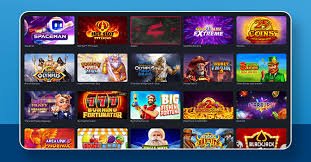
Slots, card games, bingo, and Live Casino — all types of games available directly in the app.

Dark Mode

Switch on Dark Mode for late-night sessions. It's easier on the eyes and makes for a more comfortable experience.

Bangla Interface

Use the app entirely in Bangla. Menus, betting board, and support — all available in Bangla.

Auto Update

When a new version is available, you'll automatically receive an update notification.

Download the dlb24 App — What Makes It Different?

The number of online betting platforms in Bangladesh keeps growing, but what sets dlb24 apart is the quality of its mobile app. While many platforms rely solely on their website, dlb24 was built with a mobile-first mindset from the very beginning. This makes the app incredibly easy to use — especially for those trying a betting app for the first time.

Many people assume downloading an APK is risky — but the official dlb24 APK is completely safe and kept up to date. Every version goes through virus scanning and a security audit before release, keeping your device and data protected. Avoid downloading APKs from third-party sites; always use dlb24's official channels.

What are the advantages of mobile betting?

Betting on mobile has clear advantages over desktop. First, flexibility — you can place a bet during a cricket match break, at the office, or on your commute. Second, push notifications — the dlb24 app lets you know when an important match is starting or a special offer is live. Third, payment convenience — you can deposit directly from Mobile Banking or Nagad inside the app, with no extra steps.

The dlb24 app has a built-in live scoreboard, so you never need to switch to another app to make betting decisions. Over-by-over cricket updates, minute-by-minute football action, and tennis set scores — all on a single screen.

Security & Privacy

Dlb24 uses SSL encryption to protect users' personal data and financial transactions. Two-factor authentication (2FA) is enabled for app login, adding an extra layer of security to your account. No dlb24 representative will ever ask for your password or banking details — if someone does, it may be a scam.

The dlb24 app supports biometric login. You can sign in quickly using your fingerprint on Android or Face ID on iPhone — no password typing, and more secure.

Updates & New Features

Dlb24 regularly updates its app, adding new sports, fixing bugs, and improving performance with every release. The latest update introduces virtual sports betting, an e-sports section, and enhanced live streaming support.

The "What's New" section inside the app has full details on the latest updates. dlb24 continuously improves the app based on user feedback, so feel free to share your suggestions or concerns directly with the support team.

Device Compatibility

The dlb24 app runs well even on older Android phones, including budget models with 2 GB of RAM. It has been tested and is fully supported on all major brands — Xiaomi, Samsung, Oppo, Vivo, Realme, and Nokia. On iOS, it runs seamlessly across all models from iPhone 7 through the latest iPhone 15.
Quick Info
  • Latest Version: 3.8.1
  • Android: 5.0+
  • iOS: 13.0+
  • Language: Bangla & English
  • Free Download
  • 24/7 Support
  • SSL Secured
Warning

Only download the app from dlb24's official channels. APK files from third-party sites can be harmful.

Need Help?

If you run into any issues during installation, our support team is available around the clock to help.

View FAQ
dlb24

Download the dlb24 app now

New members receive a special bonus on their first deposit. Live betting, a game lobby, and fast payments — all in one place on the dlb24 app.

FAQ

Common questions about downloading

Yes, the dlb24 app is completely free to download and install. Both the Android APK and iOS versions are free. However, you will need to deposit funds into your account to place bets or play games.

This is Android's default security setting. Go to Settings → Security or Privacy → Unknown Sources (or Install Unknown Apps) and enable it. Then try installing the APK again. You can turn this setting back off once the installation is done.

Yes, absolutely. dlb24's mobile website works well on Chrome and Safari. That said, the app offers push notifications, biometric login, and faster loading — features that aren't available on the browser.

The dlb24 app runs on any phone with Android 5.0 or above. It works smoothly even on budget devices with 2 GB of RAM, though live streaming may load a bit slower on older handsets.

When a new version is available, you'll get a notification inside the app. On Android, just download the new APK and install it over the existing one — no need to uninstall first. On iOS, the app updates automatically.
বাংলা